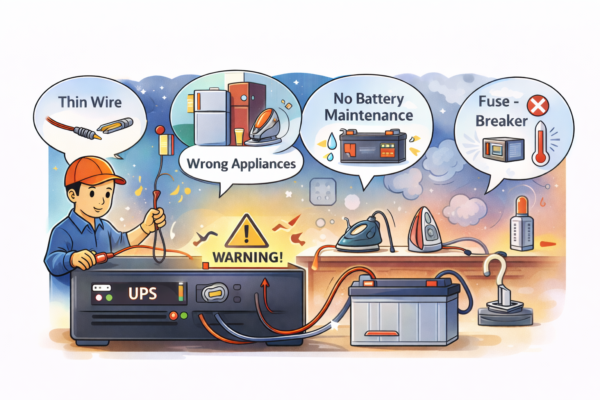
In Pakistan, a home UPS/inverter is not a luxury. It’s survival during load shedding. But a lot of UPS systems fail early or give poor backup because of simple installation mistakes.
Many people buy a decent UPS and battery, then connect it quickly through a local electrician. It works on day one, but after a few weeks you notice: low backup, fan speed slow, battery water finishing fast, or the UPS beeping all the time.
Here are the most common mistakes Pakistani homes make during UPS installation, and how you can avoid them.
Picking the wrong setup for your home
Before wiring starts, you need to know what type of system you’re making.
Common home setups in Pakistan
-
12V single battery UPS/inverter (one 150–220Ah battery): fans, lights, Wi-Fi.
-
24V two battery system (two batteries in series): better backup for bigger load.
-
Hybrid inverter (WAPDA + solar): needs correct settings for charging and priority.
-
Car battery used as UPS battery: cheap but usually the worst choice for backup.
Mistake: going 12V when your load needs 24V
If you want to run multiple fans + lights + Wi-Fi for long hours, 12V can struggle. The system draws higher current, cables heat, and battery drains faster.
Practical check:
-
If your UPS frequently warms up, cables get hot, or backup time is short even with a “big” battery, you may be under-sized.
Using the wrong battery type
This is one of the biggest reasons UPS systems disappoint.
Mistake: using a car battery
Car batteries are for starting engines, not long backup. They don’t like deep discharge. In load shedding areas, they lose capacity quickly.
Better options:
-
Tubular battery (most common and reliable for home UPS)
-
Deep-cycle batteries (if available and budget allows)
Practical check:
-
If your battery is “maintenance-free car battery” style and backup is weak, that’s a strong clue.
Wrong battery capacity (Ah) for your backup needs
Many installers say “220Ah battery is enough for everything.” That’s not true.
Backup time depends on:
-
Your actual load (fans, lights, router, TV)
-
Battery health and type
-
UPS efficiency
-
Whether you discharge too deep every day
Practical check:
-
During load shedding, write down what stays ON. You may be running more than you think.
Thin or cheap wiring (cables) between UPS and battery
This is a silent killer. Thin wires cause:
-
Voltage drop
-
Heating
-
Poor charging
-
Reduced backup time
-
Risk of melting or fire
Mistake: using small gauge cable to “save cost”
A UPS can pull high current from the battery. If the cable is thin, it heats up and wastes energy.
Practical check:
-
During load shedding, touch the battery cables (carefully).
If they feel warm/hot, cable size is likely wrong.
Also check:
-
Cable length should be as short as possible.
-
Connections should be tight and clean.
Loose terminals and poor connections
Loose terminals create resistance, which causes:
-
heating
-
sparks
-
poor charging
-
quick battery drain
Mistake: terminals not tightened properly
Sometimes the UPS works, but charging is weak and the battery dies early.
Practical check:
-
Switch off UPS safely.
-
Check the battery terminals: they should not move if you try to rotate them by hand.
-
Look for white/green powder (corrosion). Clean it properly.
Connecting the wrong appliances to UPS line
Most Pakistani homes only want backup for:
-
2–3 fans
-
lights
-
Wi-Fi
-
maybe one LED TV (optional)
Mistake: putting fridge, iron socket, microwave, or water motor on UPS
Even one heavy appliance can:
-
drain battery quickly
-
overload UPS
-
damage battery and UPS
Practical check:
-
During load shedding, see which sockets still work.
-
Make sure kitchen sockets and fridge sockets are NOT on UPS.
A common issue:
-
An electrician connects the UPS output to a whole room circuit, and later someone plugs a heavy appliance there.
No proper earthing/grounding
Earthing is often ignored, but it matters for safety and UPS performance.
Mistake: UPS installed without proper grounding
This can lead to:
-
shocks
-
unstable behavior
-
damaged electronics during surges
Practical check:
-
Ask the electrician if UPS is properly earthed.
-
If your home already has grounding, make sure UPS is integrated correctly.
If you feel mild shocks on metal parts or appliances, don’t ignore it.
Wrong charging settings on the UPS
Many UPS/inverters have modes like:
-
UPS mode / Normal mode
-
Tubular / Flat battery type
-
Charging current levels
Mistake: incorrect battery type/mode selected
If you have a tubular battery but UPS is set to wrong mode, charging may be poor or battery life reduces.
Practical check:
-
Look at your UPS settings (if screen/menu available).
-
Confirm battery type matches.
-
If charging is too aggressive, battery water may drop faster.
Poor ventilation and heat buildup
Heat reduces battery life and can affect UPS electronics.
Mistake: putting UPS in a closed cabinet or tight corner
People hide it behind curtains or in a boxed shelf. UPS heats up, fan runs continuously, and components age faster.
Practical check:
-
UPS should have space around it for airflow.
-
If UPS fan is always loud, check ventilation.
Not separating “essential load” properly
This is a planning mistake more than a wiring mistake.
Mistake: connecting too many lights/fans on UPS line
If every room is connected, your family will keep using everything like normal, and battery will drain fast.
Better approach:
-
Put only selected points on UPS line:
-
1–2 rooms fans
-
a few LED lights
-
router/ONT socket
-
Practical check:
-
Make a “UPS points list” and stick to it.
-
Mark UPS sockets with tape or a small label.
Ignoring input voltage problems from WAPDA
In many areas, WAPDA voltage is low at night or unstable. That affects charging.
Mistake: assuming battery is charging properly every time
If input voltage is low, UPS may charge slowly or not fully. Then backup time drops.
Practical check:
-
If your UPS shows input voltage, check it during night.
-
If you notice low voltage often, charging issues are expected.
In such cases, people sometimes adjust charging settings or use stabilizers, but it depends on the UPS model and wiring.
Not doing basic battery maintenance (wet/tubular)
Tubular batteries need simple care.
Mistake: never checking water level
Low water exposes plates, reduces capacity, and damages battery.
Practical check:
-
Check water level every few weeks (when battery is cool and UPS is off).
-
Use distilled water only.
-
Don’t overfill.
If you see water finishing very quickly, charging may be too high or battery is aging.
No fuse/breaker protection
Safety is often ignored in local installations.
Mistake: no proper fuse or breaker between battery and UPS
Without protection, a short circuit can cause melting wires or worse.
Practical check:
-
Ask if a fuse/breaker is installed on the battery line.
-
If not, consider adding it through a qualified electrician.
Quick installation checklist you can use
Before you finalize your UPS installation, confirm these:
-
Battery type is tubular/deep-cycle (not car battery)
-
Correct voltage setup (12V or 24V) for your load
-
Thick, short battery cables (no heating)
-
Tight terminals, no corrosion
-
Only essential points on UPS line (fans/lights/Wi-Fi)
-
Fridge, iron, microwave, motor NOT on UPS line
-
UPS has ventilation (not boxed in)
-
Correct UPS mode and battery type setting
-
Earthing is properly done
-
Basic protection (fuse/breaker) included