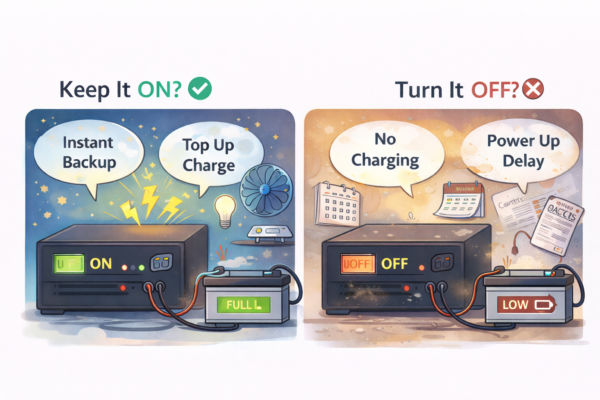
In Pakistan, many people keep the UPS/inverter ON all the time because load shedding can happen anytime. Others switch it OFF whenever WAPDA is back, thinking it will save battery life.
So what’s actually better?
The simple answer is: it depends on your setup and your routine, but in most homes it’s perfectly fine to keep it ON — as long as the system is installed properly and you’re not letting the battery deep discharge every day.
Let’s go through when to keep it ON, when to turn it OFF, and what checks you can do at home.
Common UPS/inverter setups in Pakistani homes
Most households use one of these:
-
12V single battery UPS (one 150–220Ah battery): fans, lights, Wi-Fi
-
24V inverter setup (two batteries): longer backup, better for bigger loads
-
Tubular battery + UPS/inverter: the most common “proper” home system
-
Car battery used on UPS: works short-term but gets weak quickly
-
Hybrid inverter (WAPDA + solar): behaves differently because of solar charging and settings
The “keep ON or OFF” decision is slightly different for each, but the main idea stays the same.
What happens when you keep the UPS/inverter ON all the time
When the UPS is ON and WAPDA is present:
-
It keeps the battery topped up
-
It’s ready for instant switchover during load shedding
-
It may use a small amount of power for its own electronics (self-consumption)
-
If charging settings are too aggressive, it can overcharge and waste battery water (in wet batteries)
Most good UPS/inverters manage this fine. Problems happen when the UPS is low quality, settings are wrong, or the battery is already weak.
The big advantage in Pakistan: instant backup
In load shedding areas, power can go and come back multiple times in a day. If you keep switching the UPS OFF, you might:
-
miss charging time
-
start the next outage with a half-charged battery
-
forget to switch it back ON (very common)
So for most homes, keeping it ON is more practical.
What happens when you turn it OFF when not in use
If you turn the UPS OFF while WAPDA is present:
-
Battery will not charge (unless your system has a separate charger)
-
You’ll avoid the UPS’s small self-consumption
-
You’ll reduce stress from constant float charging (only matters if settings are wrong)
-
If load shedding happens suddenly, you’ll have no backup until you switch it back ON
Turning it OFF can be useful in a few specific cases, but for many homes it creates more problems than it solves.
When you should keep it ON
Keep the UPS/inverter ON if:
-
Your area has frequent load shedding
-
You use it daily for fans/lights/Wi-Fi
-
You want smooth switchover (no interruptions)
-
Your battery is tubular and your UPS charging is working normally
-
Your UPS has proper ventilation and doesn’t overheat
Practical check: is your UPS charging correctly?
When WAPDA is present, check:
-
Battery level increases over time
-
UPS fan is not running constantly at full speed
-
Battery is not heating up unusually
-
No strong acid smell near the battery (wet batteries)
If all of this looks normal, keeping it ON is fine.
When turning it OFF makes sense
Turning it OFF can be a good idea if:
1) You won’t use it for many days
Example: you’re travelling, or the portion is empty.
If you leave it ON with no need, it may:
-
keep float charging unnecessarily
-
waste a little electricity
-
reduce battery water slowly (in wet batteries)
For long gaps, it’s okay to turn it OFF — but don’t forget battery care (more on that below).
2) Your UPS has high self-consumption
Some older or cheap UPS units drain the battery even when no load is connected.
If you notice the battery drops overnight with no load, turning it OFF when not needed can help.
Practical test:
-
Fully charge battery
-
Turn off all loads (no fan/light/router)
-
Leave UPS ON for 6–8 hours
-
If battery drops noticeably, the UPS self-consumption is high or battery is weak
3) You have overcharging or battery water finishing fast
If your battery water level drops quickly (wet/tubular), it can be due to:
-
charging voltage too high
-
poor UPS charge control
-
high room temperature + aggressive charging
In such cases, you should not just keep it ON blindly. You need to fix the setting or charger behavior.
Practical signs:
-
Battery gets warm during charging
-
Water needs topping up very frequently
-
You see bubbling/gassing a lot
-
Strong smell near battery
If this happens, get the charging checked.
4) You use solar hybrid system with wrong priority settings
Hybrid inverters can be misconfigured so they keep cycling charge/discharge or prioritize battery incorrectly.
If your battery is cycling too often even with WAPDA present, turning it OFF is not the solution. Fix the settings (battery type, float voltage, charge source priority).
Does switching OFF increase battery life?
Not automatically.
Battery life improves when you:
-
avoid deep discharge daily
-
charge properly to full
-
keep wiring and terminals clean
-
use correct battery type (tubular/deep-cycle)
-
maintain water level (for wet batteries)
-
keep the system cool and ventilated
If you keep the UPS ON but you run heavy loads and drain battery to low voltage every day, the battery will still die early.
And if you switch it OFF but forget to charge it for weeks, the battery can also get damaged.
Best practice for most Pakistani homes
Here’s a simple routine that works for most people:
If you use UPS daily
-
Keep it ON
-
Keep only essential load on UPS line (fans/lights/Wi-Fi)
-
Avoid putting fridge, iron, microwave, motor on UPS
-
Don’t let battery go to extremely low level repeatedly
If you won’t use it for 1–2 weeks
-
Turn UPS OFF
-
Make sure battery is fully charged before turning it off
-
If possible, turn it ON once every week or two to top up (especially in winter)
(Some people also disconnect one terminal for safety, but only do this if you know what you’re doing or have an electrician.)
Practical home checks you should do (simple)
Check 1: What is actually running on the UPS line?
During load shedding, walk around and note:
-
which fans and lights are on
-
which sockets work
-
if any heavy appliance socket is active
If you discover fridge/kitchen sockets on UPS, fix that first.
Check 2: Are battery cables heating up?
During backup mode (load shedding):
-
carefully touch battery cables
-
if they’re warm/hot, cables may be thin or terminals loose
Heat means power loss and stress on battery.
Check 3: Battery water level (wet/tubular only)
-
check every few weeks
-
use distilled water only
-
don’t overfill
If water finishes too quickly, charging needs adjustment.
Check 4: Is the UPS installed in a hot corner?
UPS/inverter needs airflow.
If it’s inside a cabinet or covered, heat builds up and everything ages faster.
When you should definitely turn it OFF
Turn it OFF and get help if:
-
battery is getting very hot
-
you smell burning or see melted wiring
-
UPS is making unusual noise or sparks
-
terminals are corroded heavily
-
battery is swelling (sealed batteries)
Safety first.
Quick answer for busy people
-
If load shedding is common and you use it daily: keep it ON.
-
If you’re not using it for days/weeks: turn it OFF after fully charging, then top up occasionally.
-
If water finishes fast or battery heats up: don’t rely on ON/OFF — fix charging settings and wiring.