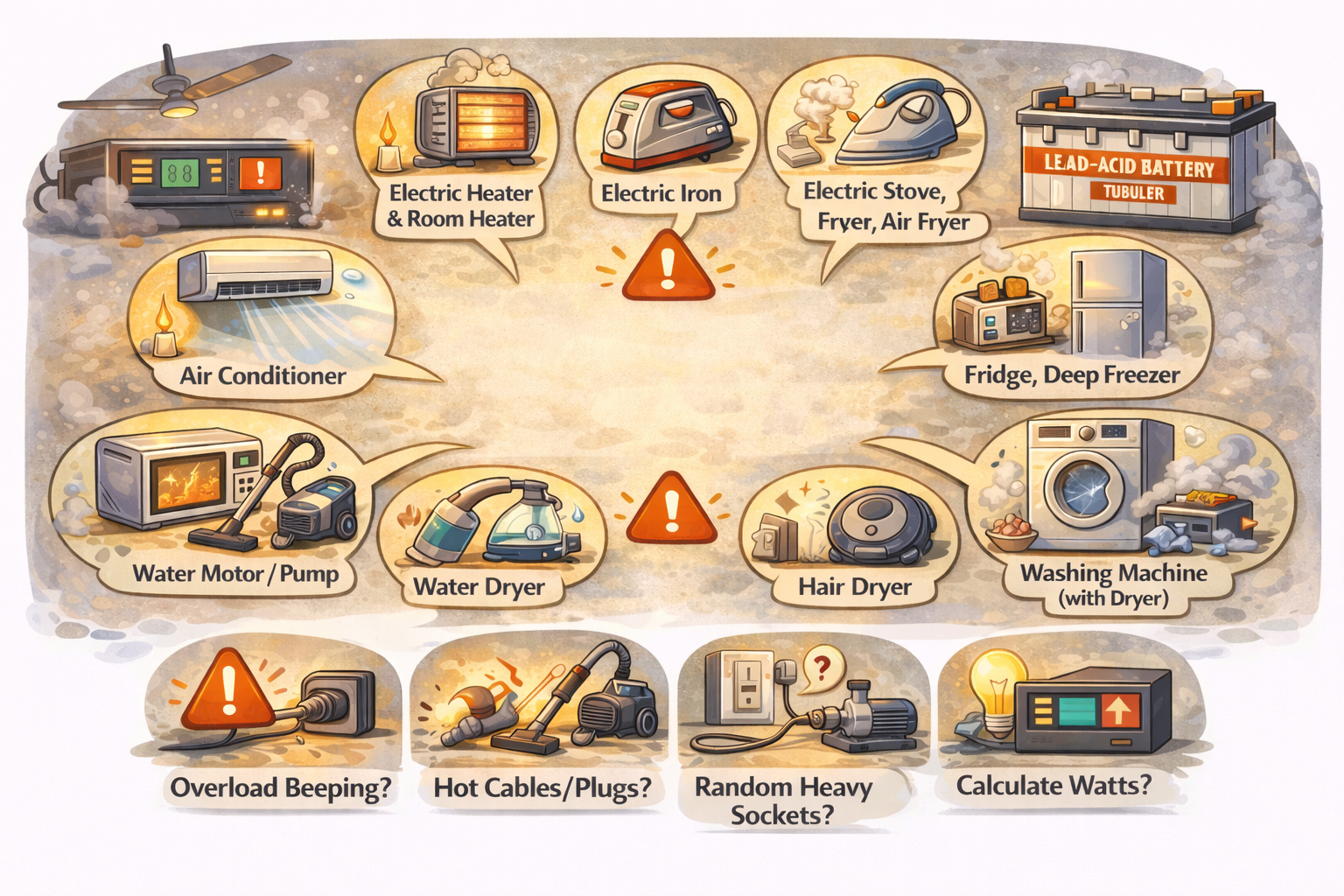
In Pakistan, load shedding can hit anytime. That’s why many homes keep a UPS or inverter ready for fans, lights, and Wi-Fi. But a very common problem happens when people start plugging in “just one more thing” during a long power cut.
Suddenly the UPS starts beeping, wires get warm, backup time becomes very short, or the inverter shuts down. In worst cases, the battery dies early or the wiring gets damaged.
A UPS/inverter is not meant to run everything. Some appliances pull heavy power, some have strong starting surges, and some simply waste your battery too fast.
This guide explains what to avoid, why it’s risky, and simple checks you can do at home.
Common UPS/Inverter Setups in Pakistani Homes
Most homes use one of these:
-
12V setup: one 150–220Ah tubular battery with a UPS (common in portions)
-
24V setup: two batteries in series for better backup and lower current draw
-
Hybrid inverter: solar + grid + battery, with different modes and settings
-
Mixed wiring: a “UPS line” that powers selected lights/fans, plus some sockets
The issue usually starts when heavy appliances get connected to the UPS line by mistake or by “jugaar” extensions.
Why Some Appliances Are a Bad Idea on UPS/Inverter
There are three main reasons:
High continuous power
Some things consume too much power continuously. They will drain the battery fast and overheat wires.
High starting surge
Motors and compressors need a sudden big push to start. That surge can trip the inverter or damage it over time.
Heating element loads
Heaters are battery killers. They are made to convert electricity into heat — so they consume a lot.
Appliances You Should Avoid Running on a UPS/Inverter
1) Electric heater and room heater
Room heaters pull huge power. Even a “small” heater can drain a full battery quickly.
What happens
-
battery drops fast
-
inverter overload beeps
-
wiring heats up
If you want warmth during load shedding, use blankets and keep UPS for lights/fans only.
2) Electric iron
Iron is a classic overload appliance. People plug it in quickly “for 2 minutes,” but it pulls heavy power immediately.
What happens
-
instant overload
-
inverter trips
-
cable heating near the socket
3) Kettle, electric stove, toaster, air fryer
Anything that makes heat for cooking is usually not UPS-friendly.
What happens
-
battery drains extremely fast
-
inverter may shut down from overload
4) Microwave oven
Microwaves draw high power and can cause the inverter to trip or beep.
Even if it runs, it will eat battery very fast.
5) Fridge and deep freezer (usually avoid)
Some people run a fridge on inverter, especially in long load shedding. It depends on inverter size and wiring, but in most normal home UPS setups, it’s risky.
Why?
-
compressor has high starting surge
-
repeated on/off cycles
-
heavy load over time
What happens
-
inverter overload on compressor start
-
battery drain becomes very fast
-
shorter battery life
If you must run a fridge, it needs proper planning (right inverter capacity, proper wiring, and ideally solar support). For a typical 12V UPS system, avoid it.
6) Water motor / pump
Motors have strong starting surge. A water pump can trip the inverter instantly.
What happens
-
inverter trips or beeps
-
wiring and terminals heat up
-
possible damage to inverter
7) Air conditioner
Most home UPS/inverters are not meant for AC. AC is heavy load + motor surge.
If someone tries it, it usually ends with overload.
8) Washing machine (and especially dryer)
Washing machines have motor load and can spike. Dryer/heating modes are even heavier.
Better to avoid on standard UPS setups.
9) Hair dryer
Hair dryer is a heating element load. It drains battery fast and can overload.
10) Vacuum cleaner
High power draw and strong motor start. Not UPS-friendly for typical home setups.
Appliances That Are Usually Safe on UPS/Inverter
Most normal UPS loads are fine:
-
LED lights
-
fans (reasonable number)
-
Wi-Fi router + ONT
-
phone charging
-
laptop (especially)
-
small LED TV (usually okay)
Even here, you still need to watch total load. Three fans + many lights + TV can become heavy for a small system.
The Hidden Danger: “UPS Line” Sockets
In many Pakistani homes, a socket that looks normal is secretly connected to UPS wiring. Later, someone plugs in:
-
fridge
-
iron
-
heater
-
pump controller
-
kitchen appliance
This is one of the biggest reasons batteries die early.
Quick home check during load shedding
When the grid goes off, walk around and test:
-
which sockets still work?
-
which room lights stay on?
-
does any kitchen socket work?
-
does a fridge socket stay on?
If any heavy appliance socket works during load shedding, that’s a problem to fix.
Practical Checks You Can Do at Home
Check 1: Look for overload signs
If your inverter:
-
beeps when you turn something on
-
shows overload indicator
-
shuts down suddenly
That appliance should not be on UPS.
Check 2: Feel cable heating (carefully)
During load shedding, after 10–15 minutes of use:
-
touch the UPS plug, extension, and battery cables (carefully)
-
if anything is hot, you have overload or loose wiring
Warm is okay. Hot is not.
Check 3: Do a “safe load test”
Try a controlled setup:
-
1 fan
-
Wi-Fi only
-
2 LED lights
See how long backup lasts. This gives you a baseline. If you add a TV and backup drops sharply, you’ll understand how much it costs.
Check 4: Calculate roughly (simple method)
Look at appliance labels:
-
LED bulb: 9–15W
-
fan: often 60–90W (varies)
-
TV: 60–150W (varies)
-
iron/heater: 1000W+ (very heavy)
Even without perfect math, you can spot which ones are too big.
How to Use UPS Smarter During Load Shedding
Keep UPS for “must-have” items only
Good priority list:
-
fans (limited)
-
LED lights (few)
-
Wi-Fi (important)
-
phone/laptop charging
Everything else is optional.
Reduce load at night
Night backup fails faster because everything runs longer. Limit extra lights and avoid TV if battery is small.
Fix wiring mistakes
If heavy sockets are on UPS line, get an electrician to separate them. This is one of the best upgrades you can do without buying anything new.
When to Call a Technician
Call a technician if:
-
battery cables get hot regularly
-
terminals spark or smell burnt
-
inverter shuts down often even on small load
-
you suspect fridge/pump sockets are connected to UPS line
-
you’re not sure about your wiring
Ask them to check:
-
cable thickness
-
terminal tightness and corrosion
-
load distribution on UPS line
-
inverter capacity vs your real load